4 Best AI Hairstyle Try-On Apps in 2026 to Preview Your Next Haircut
Compare four AI hairstyle try-on apps by photo input, hairstyle choices, access, saved results, privacy evidence, and real-world limits.

· 14 min read

On this page
The best hairstyle try-on app depends on what you want to compare. HairWow fits a browser-based personal-photo shortlist, HairstyleAI offers a dedicated web workflow, YouCam Makeup combines hairstyle previews with a broader beauty suite, and Facetune puts hair changes inside a photo editor. There is no reliable evidence that one is universally the most accurate. Use the same clear photo in every app, check the current upload terms, and treat each result as a reference for your next haircut, not a promise of how the cut will turn out.
Disclosure: HairWow publishes this guide and is one of the four tools covered. We applied the same fields to every product and did not run a controlled accuracy test.
Key takeaways
- Pick an app for its workflow, not for a vague claim that it is the "most realistic."
- Compare three to five genuinely different cuts on one base photo before refining details.
- Check the current platform, payment terms, saving options, and photo policy before uploading.
- A generated preview can clarify length, fringe, volume, and outline. It cannot account for every growth pattern, texture, angle, or cutting technique.
An AI hairstyle try-on app is a web or mobile tool that applies a generated haircut, hair shape, or color direction to a personal photo. It is useful for comparing ideas on a familiar face. It is not a simulation of how a stylist will cut your actual hair.
Quick answer: which app fits which hairstyle try-on job?
| App | Best fit | Current access described by the official page | Main tradeoff |
|---|---|---|---|
| HairWow | Building a browser-based shortlist from your own photo | Web entry point, plus iOS and Android links | Published by the company behind this guide; preview is visual guidance only |
| HairstyleAI | A dedicated browser workflow with many visible style choices | Web upload with account and credit language | Its official pages do not give one consistent statement about exact image-retention timing |
| YouCam Makeup | People who want hairstyle try-on inside a broader beauty suite | Web browser plus iOS and Android options | Feature availability and entitlements may differ by platform |
| Facetune | People who already use a photo editor and want hair changes in the same workflow | App-led workflow with a current trial offer | It is broader than a dedicated hairstyle comparison tool |
These are job-based fits, not an accuracy ranking. Each description comes from current first-party product pages checked on July 31, 2026. Access, trials, credits, and plan limits can change, so verify them at the point of use.
How we compare hairstyle try-on apps without inventing an accuracy score
It is easy to rank hairstyle apps by putting "realistic" beside one name and "easy to use" beside another. That tells you almost nothing. Without the same photos, prompts, review criteria, and a repeatable scoring method, a numerical accuracy ranking would be decoration.
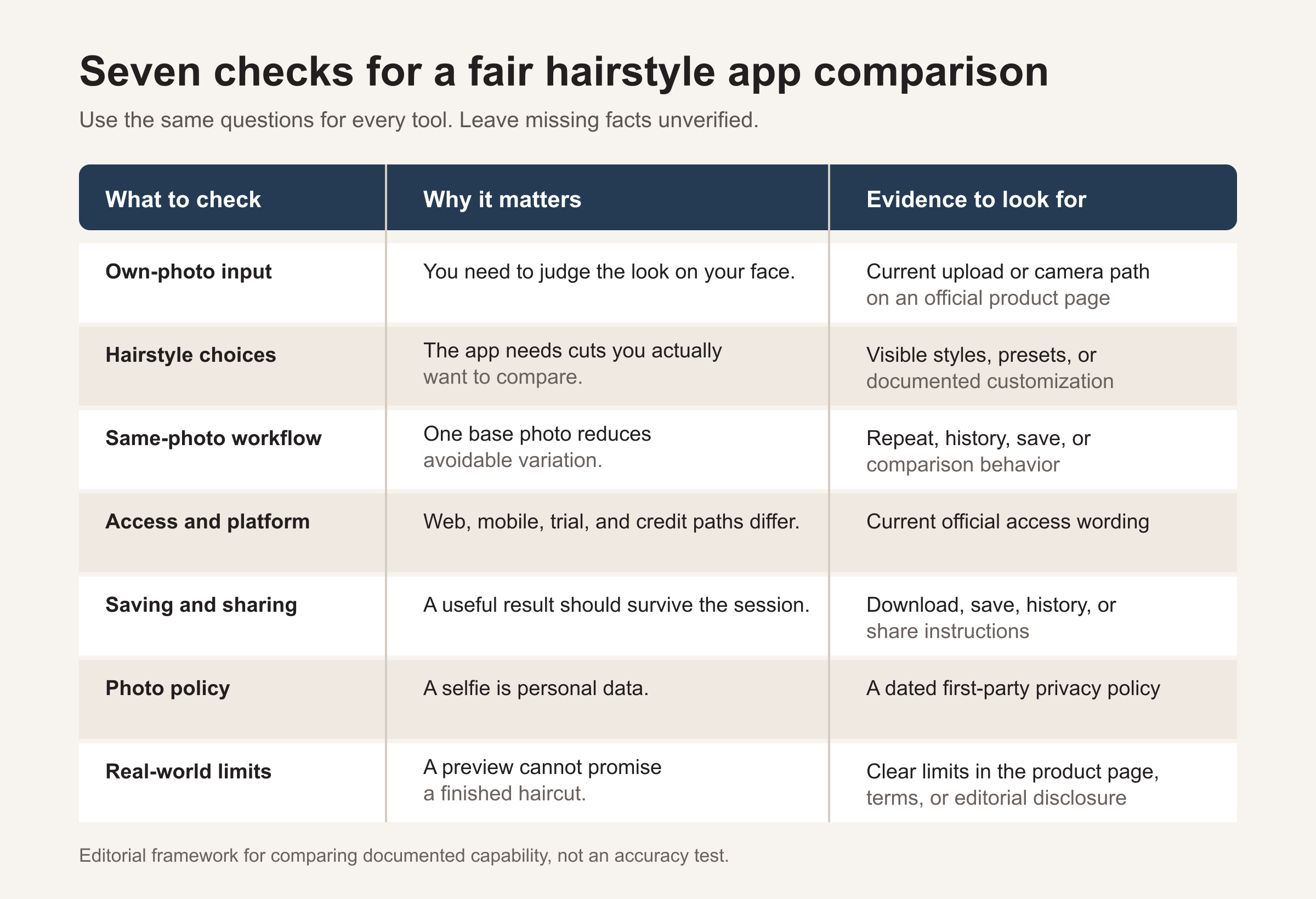
We use seven questions instead:
- Can you use your own photo?
- Are there hairstyle choices you actually want to compare?
- Can you keep the base photo consistent?
- Is the current access path clear?
- Can you save or share a useful result?
- Is there a dated first-party photo or privacy policy?
- Does the comparison state what the preview cannot prove?
The weights are 20 percent each for own-photo input and hairstyle choices, 15 percent each for same-photo comparison and access, and 10 percent each for saving, privacy evidence, and real-world limitations. The weights organize the decision. They are not converted into a winner's score because the underlying evidence is mostly product documentation, not independent performance testing.
We also label the strength of each statement:
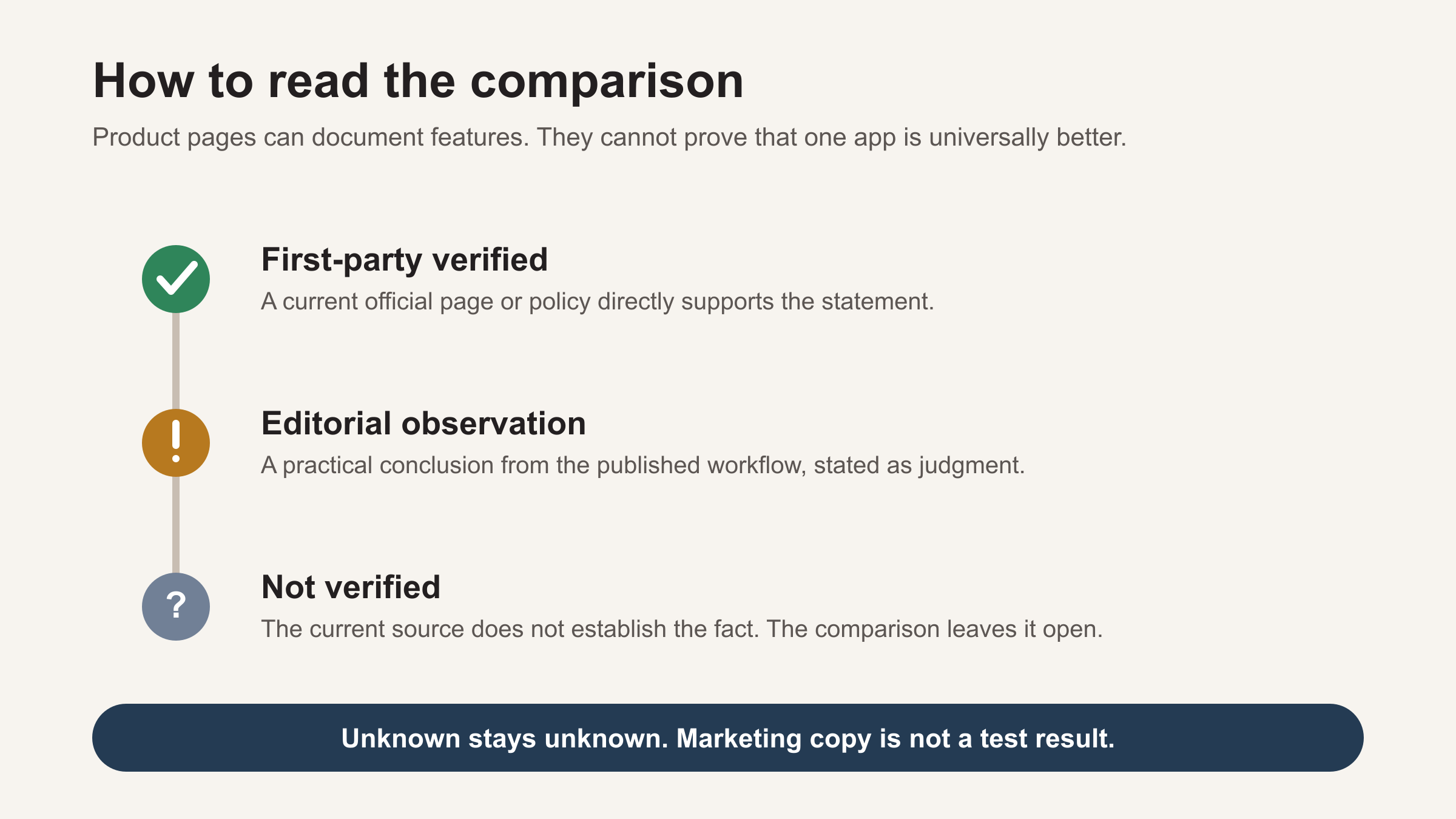
First-party verified means a current official page supports the statement. Editorial observation means we are explaining how a documented feature may fit a reader's task. Not verified means the public pages we reviewed did not settle the question. Missing information stays missing rather than becoming a guess.
The best AI hairstyle try-on apps to compare in 2026
1. HairWow: best for a browser entry point and saved shortlist
HairWow presents hairstyle and color previews built around a personal photo or live camera. Its current site describes more than 100 looks and ways to explore length, volume, parting, gradient, and warmth. The public style library is useful if you need names and examples before opening the try-on flow.
- Best for: Comparing a small set of haircut directions in a browser, then keeping the useful results together.
- Own-photo input: The official site describes photo upload and live-camera paths.
- Hairstyle choices: Current first-party pages show hairstyle and hair-color categories, plus choices related to length, volume, and parting.
- Same-photo comparison: The site describes side-by-side comparison and saved results. That supports a shortlist workflow, though it does not make the output scientifically repeatable.
- Access: The current site provides a web entry point and links to iOS and Android.
- Saving and sharing: Saved results are part of the documented flow. Confirm any account requirements when you start.
- Privacy evidence: A dated HairWow privacy policy is available. Read its current image-processing and retention sections before uploading.
- Key limitation: HairWow's own 2026 try-on research describes previews as visual guidance rather than a haircut guarantee. The tool cannot inspect your hair from every angle or know how a specific stylist will execute a cut.
HairWow is the owned product in this comparison. That is why we state its relationship here rather than presenting its placement as an independent award.
2. HairstyleAI: best for a dedicated browser workflow
HairstyleAI focuses its public experience on hairstyle generation rather than a full beauty editor. Its site shows photo upload, a large visible set of hairstyle and hair-color choices, a credit system, and download or share actions.
- Best for: Someone who wants a focused web tool and a wide menu of named style directions.
- Own-photo input: The official homepage and terms describe uploading a photo.
- Hairstyle choices: The current site displays many cuts, lengths, textures, and colors.
- Same-photo comparison: The terms describe generation, download, and history functions. Keep your base image and crop unchanged if you want a cleaner comparison.
- Access: Web based, with login and credits referenced on the official pages. Check current credit terms before paying.
- Saving and sharing: Download, share, and history behavior are described.
- Privacy evidence: A dated privacy policy exists, but the homepage, FAQ, policy, and terms do not use one consistent retention description. The safest choice is to read the current policy and terms yourself before uploading.
- Key limitation: Its terms do not guarantee accuracy. A broad preset menu does not prove that every style will map equally well to every photo.
The main appeal is focus. If you do not need makeup or general photo-editing tools, a dedicated interface can reduce the number of unrelated choices around the haircut task.
3. YouCam Makeup: best for a broader beauty suite and platform choice
Perfect Corp's current YouCam hairstyle page describes more than 60 hairstyle filters, personal-photo input, hair-color changes, and choices involving length and style. It also points readers to browser, iOS, and Android access.
- Best for: Trying hairstyles alongside other beauty looks, with a choice of web or mobile access.
- Own-photo input: The official page supports using your own image.
- Hairstyle choices: Documented options include multiple hairstyles, colors, and length directions.
- Same-photo comparison: You can reuse one photo, but confirm the exact save or history behavior on the platform you choose.
- Access: Official materials describe browser use and mobile apps. Some features or entitlements may differ by device and plan.
- Saving and sharing: Save and share actions are described on the product page.
- Privacy evidence: Perfect Corp publishes a dated YouCam privacy policy. Review the sections relevant to the surface you plan to use.
- Key limitation: A broad beauty suite offers flexibility, but it also makes the product less focused than a hairstyle-only flow. The public page does not establish an independent accuracy advantage.
YouCam makes the most sense when hairstyle preview is one part of a larger beauty experiment. If the only question is "bob or long layers," the extra tools may not add much.
4. Facetune: best for people already using a photo editor
Facetune's virtual hair page combines hairstyle and hair-color changes with its existing editing workflow. The official page describes preset hairstyles, custom text prompts, colors, highlights, shine, texture, and detail adjustments.
- Best for: Existing photo-editor users who want to explore hair changes without moving to a dedicated try-on product.
- Own-photo input: The feature starts from a personal photo.
- Hairstyle choices: Presets and custom prompts are documented, along with color and appearance adjustments.
- Same-photo comparison: Keeping one source photo is practical inside an editor, but the current public page does not document a formal side-by-side test mode.
- Access: Facetune is app led. Its page currently advertises a trial, and current trial or subscription terms should be checked before starting.
- Saving and sharing: Exporting an edited image is a core part of the documented workflow.
- Privacy evidence: A first-party privacy policy is available. Read the version that applies to your product and region.
- Key limitation: Editing flexibility can help express a very specific idea, yet a custom prompt can also change more than the haircut. Watch for shifts in face shape, lighting, or image texture that make two results harder to compare.
Facetune fits people who already think in terms of photo edits. Someone seeking a simple catalog of cuts may prefer a more specialized interface.
Side-by-side criteria matrix
This table compares documented capability and evidence status. "Not verified" means we did not find a clear current statement on the reviewed public pages. It does not mean a feature is absent.
| Criterion | HairWow | HairstyleAI | YouCam Makeup | Facetune |
|---|---|---|---|---|
| Own-photo input | First-party verified | First-party verified | First-party verified | First-party verified |
| Hairstyle choices | 100+ looks and documented length, volume, and parting choices | Many visible styles and colors | 60+ filters plus styles, colors, and lengths | Presets, prompts, colors, and appearance adjustments |
| Same-photo comparison | Side-by-side and saved-result language found | Generation, download, and history language found | Reuse is possible; exact history behavior varies or is not verified | Reuse is possible; formal comparison mode not verified |
| Current access | Web, iOS, and Android links | Web, login, and credit language | Browser, iOS, and Android | App-led, with current trial language |
| Save or share | Saved-result flow documented | Download, share, and history documented | Save and share documented | Image export fits the editor workflow |
| Privacy evidence | Dated first-party policy found | Dated policy found; public wording conflicts on timing | Dated first-party policy found | First-party policy found |
| Main limitation | Visual guidance, not a haircut guarantee | No guaranteed accuracy | Platform and entitlement details can vary | Edits may change more than the hairstyle |
Product pages change. Treat the matrix as a dated starting point, then confirm the access and policy details that matter to you.
What hairstyle previews can and cannot tell you
A useful preview can answer a visual question: Does a shorter outline feel balanced on my face? Do I prefer a center part or a side part? Does a fringe make the overall shape feel heavier? Is the difference between a chin-length bob and shoulder-length layers large enough to keep exploring?
It can also help you build shared vocabulary. A saved image plus a named style is easier to discuss than "short, but not too short." If bangs are the main decision, our guide to thinking through bangs and face shape gives you more questions to take into that conversation.
The preview cannot measure density, cowlicks, shrinkage, growth direction, previous chemical services, or the skill and technique of the person doing the cut. A front-facing photo also says little about the back and sides. Even a convincing image cannot tell you how the shape will behave after washing, styling, humidity, or six weeks of growth.
Look closely for generated artifacts around ears, glasses, hairlines, shoulders, and background edges. If the tool changes your face or head position between versions, the comparison has become less useful. The goal is not to find the prettiest generated picture. It is to isolate the haircut difference you want to discuss.
Where HairWow fits
HairWow is useful when you want to compare a few haircut directions on your own photo and keep the strongest options as references. The browser entry point reduces setup, while the style library gives you named looks to explore before you generate anything.
The same limitation applies here as it does to every app in this guide: the preview is a visual decision aid, not evidence that a stylist can reproduce every generated detail on your real hair.
If that workflow matches what you need, you can try a few hairstyle directions in HairWow. Keep the shortlist small and use it to start a conversation, not to demand an exact copy of a generated result.
How to choose one app before uploading your photo
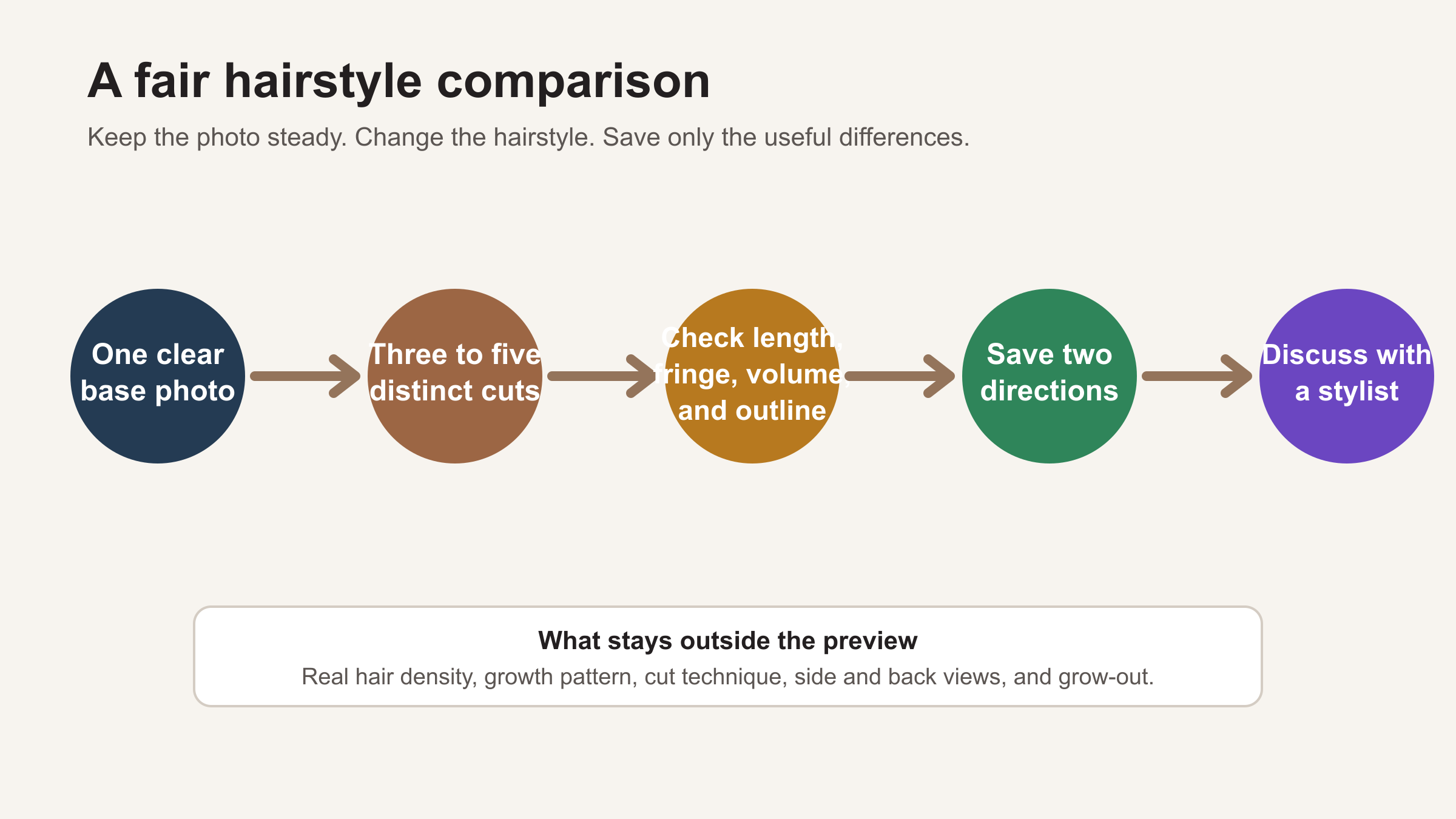
Start with the smallest workflow that can answer your question.
- Check access first. Decide whether you want a browser or mobile app, then verify current account, trial, subscription, or credit terms.
- Read the photo policy. A selfie is personal data. Look for a dated official policy and read the sections on image processing, storage, deletion, and third-party services.
- Prepare one base photo. Use even light, a front-facing pose, visible hair edges, and a simple background. Avoid heavy filters.
- Choose three to five distinct cuts. Compare meaningful differences such as pixie, bob, lob, and long layers before making tiny refinements.
- Keep the image fixed. Use the same crop and pose. If the app keeps changing other parts of the image, do not treat the results as a fair hairstyle comparison.
- Save only two directions. Label each with the app, style name, and date. Bring both to a stylist and ask about length, layering, fringe, maintenance, and how the shape will work with your hair.
Frequently asked questions
Is there a hairstyle try-on app that is completely free?
We did not label any option "completely free" because trials, credits, account gates, and feature limits can change. Check the current product screen before uploading or paying. A free entry point also does not tell you whether saving, higher-resolution output, or additional styles require a plan.
Which hairstyle app lets me use my own photo?
HairWow, HairstyleAI, YouCam Makeup, and Facetune all describe personal-photo input on their current official pages. The better question is what happens after upload: which styles you can compare, whether the photo stays consistent, how you can save the result, and what the current policy says about image handling.
Are browser-based hairstyle tools better than mobile apps?
Neither format is automatically better. A browser tool is convenient when you do not want to install another app. A mobile app may fit better if you want a camera-led flow, repeated edits, or easy sharing from your phone. Compare the actual features and terms on the platform you will use.
Can a hairstyle app show exactly how a haircut will look?
No. It can create a visual reference for shape, length, fringe, parting, volume, and color direction. It cannot guarantee how your real hair will respond to the cut, styling, weather, or growth. Use the image as a discussion aid.
What should I check before uploading a selfie?
Confirm who operates the tool, whether the page is current, what access or payment is required, and how the official policy describes image processing and retention. Use a photo you are comfortable sharing with that service. If the information is missing or contradictory, pause rather than assuming the most favorable interpretation.
Summary
HairWow, HairstyleAI, YouCam Makeup, and Facetune each support a different hairstyle-preview workflow. Choose by photo input, hairstyle choices, access, saving, and clear policy evidence rather than an unsupported accuracy claim. Keep one base photo, compare only a few distinct cuts, and save two useful directions for a stylist conversation.
References
- https://www.gohairwow.com/en
- https://www.gohairwow.com/research/ai-hairstyle-try-on-trends-2026
- https://www.gohairwow.com/en/settings/privacy-policy
- https://hairstyleai.ai/
- https://hairstyleai.ai/privacy-policy
- https://hairstyleai.ai/terms-of-service
- https://www.perfectcorp.com/consumer/features/ai-hairstyle-changer/
- https://www.perfectcorp.com/perfectbeauty/youcam/privacy-policy
- https://www.facetuneapp.com/features/virtual-hair-color-and-style
- https://static.facetuneapp.com/legal/privacy-policy.pdf